Databricks Lakebase vs PostgreSQL: What Changes for AI Apps?
Explore Databricks Lakebase vs PostgreSQL for AI applications, comparing scalability, serverless architecture, data synchronization, vector search, and database performance for generative AI and autonomous agent workloads.
Building AI apps requires database speeds that traditional setups struggle to deliver. As transactional writes, chat histories, and vector embeddings multiply, standard databases hit performance walls.
Enter Databricks Lakebase: a serverless, managed PostgreSQL architecture that connects operational data directly to lakehouse analytics.
This side-by-side comparison explores what changes when migrating from standard PostgreSQL to Lakebase, helping technical leaders choose the right data foundation for autonomous agents and generative workflows.
The Operational Database Challenge in AI Architectures
AI applications demand simultaneous data operations: low-latency writes for live conversation states and immediate analytical access for model evaluations. Traditional software separates these jobs. Applications store transactional records in relational databases, then run ETL tasks to update separate analytical warehouses.
Generative models and autonomous agents change these operational needs. AI agents require sub-second speed to write conversation histories, update reasoning steps, and fetch vector embeddings. Simultaneously, evaluation engines need immediate visibility into operational logs without waiting for batch syncs.
Forbes research shows data platform modernization represents the top data investment priority for 40.7% of enterprise organizations, with 42% running active AI systems.
Comparing databricks lakebase vs postgreSQL reveals how operational state connects directly to data intelligence platforms. Standard relational databases suit classic software, but high-throughput production deployments need architectures that link real-time transaction processing directly to lakehouse storage.
Enterprise teams creating long-term strategies through a generative ai roadmap 2026 align operational database selection with core business requirements.
Technical Comparison: Databricks Lakebase vs PostgreSQL
PostgreSQL operates as a classic relational database engine where compute and storage are bound to server instances, requiring fixed connection limits and separate extraction pipelines. It supports extensions like pgvector, yet running heavy analytics against active nodes creates severe bottlenecks.
Databricks Lakebase modifies this pattern by running managed open-source PostgreSQL on serverless compute decoupled from underlying storage. Operating natively inside the Databricks Data Intelligence Platform, Lakebase maintains full wire-protocol compatibility with standard drivers. Operational writes execute with low latency, and Change Data Feed features stream changes straight into Delta Lake, eliminating independent pipelines.
Architectural Dimension | Traditional PostgreSQL Deployment | Databricks Lakebase Architecture |
|---|---|---|
Compute-Storage Model | Tightly coupled compute and block storage | Decoupled serverless compute on open lakehouse storage |
Scalability & Elasticity | Static instance provisioning; manual cluster resizing | Serverless autoscaling with automatic scale-to-zero compute |
Lakehouse Synchronization | Requires custom ETL, Kafka, or CDC pipeline maintenance | Native Delta Lake sync & direct Change Data Feed (CDF) |
Development Workflows | Schema migrations performed directly on live databases | Instant Copy-on-Write database branching for testing |
Connection Management | External setup required (e.g., self-managed PgBouncer) | Built-in PgBouncer connection pooling out of the box |
Governance & Security | Database-level RBAC isolated from data platform | Native Unity Catalog governance and attribute-based security |
Vector Search Capabilities | Supported via pgvector extension on local instance | Built-in pgvector with direct lakehouse embedding sync |
Detailed Architectural Differences
1. Decoupled Compute and Storage Architecture
Traditional relational databases tie storage performance directly to compute hardware. Expanding disk capacity or compute power requires resizing physical instances or adding read replicas.
Lakebase separates compute nodes from underlying cloud storage. Storage scales independently in open formats, allowing serverless compute nodes to adjust dynamically without storage migration risks.
2. Serverless Elasticity and Scale-to-Zero
AI workloads experience unpredictable spikes when autonomous agents run complex reasoning workflows. Static PostgreSQL instances remain fully provisioned during quiet hours, accumulating unnecessary infrastructure costs.
Lakebase automatically scales compute resources up during traffic surges to sustain high write rates, then scales down to zero during idle periods, slashing idle database infrastructure costs by up to 40% to 60%.
3. Native Zero-ETL Synchronization
Bridging operational applications with analytical data lakes traditionally demands maintenance-heavy Change Data Capture (CDC) pipelines.
Lakebase includes native Change Data Feed capabilities. Transaction logs stream into Delta Lake tables automatically, supplying real-time operational data to downstream AI evaluation models without custom ingestion code.
4. Integrated Connection Pooling
Deploying thousands of concurrent agent instances can quickly exhaust traditional PostgreSQL database connection limits. Setting up external connection proxies adds architectural complexity.
Lakebase integrates PgBouncer directly into the database endpoint. The platform manages connection pooling natively, maintaining stable query performance during concurrent traffic spikes.
5. Instant Database Branching
Testing new LLM prompts or database schema migrations against real production data carries operational risks.
Lakebase provides Copy-on-Write database branching. Developers clone production states instantly to run comprehensive evaluation suites without duplicating underlying physical storage or disrupting live application traffic.
Impact on Generative AI Services and Agent Workloads
Deploying enterprise Generative AI Services requires specialized database architecture to handle high query volumes without causing data synchronization delays. Projects centered on Generative AI Solutions Development rely on execution environments that remove structural bottlenecks.
Persistent Agent Scratchpads and Transactional State
Autonomous agents run multi-step reasoning cycles. Every step generates intermediate thought steps, tool outputs, and structured responses requiring fast persistent storage.
In standard PostgreSQL systems, high-volume concurrent writes from agent fleets exhaust open connection pools.
Databricks Lakebase incorporates native PgBouncer connection management to handle thousands of concurrent agent writes, streaming operational records directly into tables accessible to evaluation pipelines without delay.
Database Branching for AI Testing Solutions
Validating LLM outputs demands reliable testing setups. Databricks Lakebase utilizes Copy-on-Write technology, allowing teams to create instant database branches from active production snapshots. Developers test prompt iterations or schema updates against realistic production states without affecting live applications or multiplying storage expenses.
Combining this feature with dedicated AI/ML testing services and specialized AI testing solutions supports rigorous validation before deployment.
Unity Catalog Governance and Data Security
Data governance poses major hurdles during enterprise deployment. Managing isolated database permissions separate from data lake access controls introduces security risks.
Databricks Lakebase registers directly within Unity Catalog, applying unified attribute-based access rules across operational tables and lakehouse datasets.
Organizations creating an enterprise AI Governance Framework secure full audit visibility across application tables and analytical data assets.
Autoscaling and AI Cost Optimization
Fluctuating user activity leads to over-provisioned database servers when using standard PostgreSQL instances. Databricks Lakebase features serverless compute that automatically expands during traffic spikes and scales down to zero during idle periods.
Technical leaders seeking methods to control infrastructure expenses review detailed approaches in AI Cost Optimization alongside deployment patterns in Scaling AI Inference Infrastructure.
How to Migrate Operational AI Storage from PostgreSQL to Databricks Lakebase
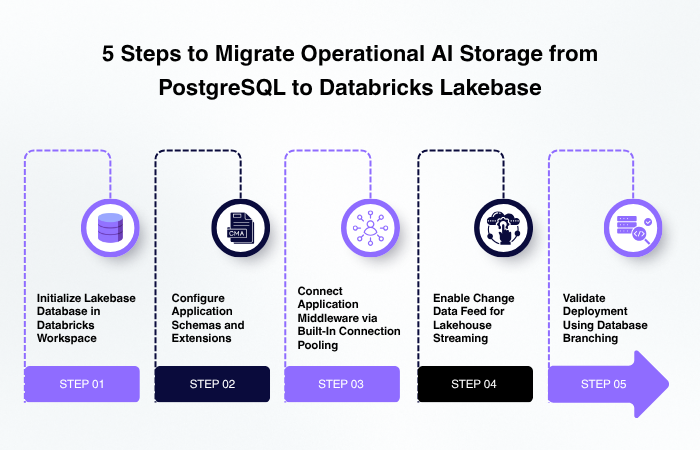
Migrating operational application storage to serverless Lakebase involves systematic steps to align relational schemas with unified lakehouse workflows.
Step 1: Initialize Lakebase Database in Databricks Workspace
Create the serverless Lakebase database instance within the enterprise Databricks workspace. Define autoscaling boundaries, recovery windows, and scale-to-zero timers.
Step 2: Configure Application Schemas and Extensions
Run DDL scripts through standard PostgreSQL drivers or ORMs such as SQLAlchemy and Prisma. Enable required PostgreSQL extensions, including pgvector for vector embedding storage or PostGIS for spatial tracking.
Step 3: Connect Application Middleware via Built-In Connection Pooling
Point application database connections to the integrated PgBouncer pool endpoint. Authenticate connections using Databricks OAuth tokens to remove static credential risks.
Step 4: Enable Change Data Feed for Lakehouse Streaming
Turn on Change Data Feed features across target application tables. Operational database writes automatically mirror to Delta Lake tables, making transactional logs immediately available to real-time analytics platforms.
Step 5: Validate Deployment Using Database Branching
Create an isolated database branch to execute comprehensive integration testing. Verify schema migrations and prompt performance before routing production user traffic to the new serverless endpoint.
Real-World AI Implementations and Enterprise Results
Engineering teams at MoogleLabs build production architectures using unified data platforms. Work across enterprise implementations shows advantages when connecting operational database layers directly to intelligence platforms.
In an enterprise knowledge management deployment, engineers implemented a unified search system handling structured and unstructured data.
The system combined fast transactional session management with vector retrieval, enabling secure context-aware responses across internal repositories. By linking operational storage directly to data lake analytics, the team eliminated batch sync pipelines, cut retrieval latencies, and maintained strict access controls across corporate repositories.
Decision Framework for Enterprise Business Leaders
Choosing between PostgreSQL and Databricks Lakebase depends on application data patterns and infrastructure goals. Standard PostgreSQL works well for standalone transactional software with predictable user traffic and minimal integration requirements with analytical lakehouses.
Databricks Lakebase represents the choice for teams building interactive AI applications, autonomous agents, or real-time feature stores. Removing separate custom sync pipelines lowers infrastructure overhead while speeding up model iteration cycles. Organizations seeking external guidance regarding strategic choices review artificial intelligence services to align software choices with business targets.
Conclusion
Selecting between PostgreSQL and Databricks Lakebase shapes how effectively organizations scale transactional AI systems. Traditional PostgreSQL remains dependable for standalone, isolated applications.
Databricks Lakebase unlocks serverless elasticity, zero-ETL lakehouse synchronization, and instant branching for complex agentic workflows. Business decision-makers adopting Lakebase streamline data engineering overhead while establishing an infrastructure ready for real-time generative capabilities.
Partner with MoogleLabs' subject matter experts or schedule a strategic architectural audit to modernize their data foundations safely.
Loading FAQs
Please wait while we fetch the questions...